Blog
Drawing Revision Control: Managing Current and Superseded Sets

CEO & Founder, AODocs · Sep 29, 2026 · Updated Oct 23, 2026

Drawing revision control: managing current and superseded sets
Drawing revision control is the process used to identify which drawing revision is authorized for a stated purpose, control its distribution to defined recipients, and remove superseded sets from current-use channels so outdated drawings are not used in construction, review, or handover. This guide is intended for document controllers, project teams, engineering information managers, and capital project directors responsible for controlled drawings. Drawing revision control tracks changes in engineering drawings and records them under the project procedure. It reduces the risk of wrong-revision use; current-set access, downloads, offline copies and controlled prints still need verification.
Drawing revision control supports accountability and coordination by recording changes, approvals and issue history. It does not by itself establish engineering accuracy or prevent every production error.
1. What drawing revision control means
Drawing revision control is the process used to identify which drawing revision is authorized for a stated purpose, control its distribution to defined recipients, and remove superseded sets from current-use channels so outdated drawings are not used in construction, review, or handover.
For document controllers, project teams, engineering information managers, and capital project directors responsible for controlled drawings, the distinction matters: file storage and version history record saved states, while revision, status, issue purpose, approval evidence, and supersession rules determine what the project authorizes for a defined use. This article explains how drawing revision control works in formal document workflows, where errors occur, what metadata and role assignments are required, how approval and supersession should be handled, how digital and printed copies are controlled, how urgent field changes are managed, and what to audit to prove the correct revision was issued and used.
Key takeaways
- The latest file version is not necessarily the drawing revision authorized for use.
- Revision, status, purpose of issue, approval evidence and distribution history must remain distinct and retrievable.
- Supersession must be tested across search, links, downloads, offline devices and controlled prints, not only in one platform view.
Version, revision block, status and purpose of issue
A version is a saved state in a system and may include internal drafts. A revision is a project-controlled identifier applied under the document-control procedure. Status, suitability and purpose codes communicate state or permitted use according to project rules; some schemas combine them. Approval and release evidence remain distinct from the revision label.
| Term | Working definition | Example | Possible owner, project-defined |
|---|---|---|---|
| Version | Saved state, which may be a draft | v1, v2, v3 | System or author |
| Revision | Controlled identifier for an issued change | Rev B, Rev C | Design authority |
| Status, suitability or purpose code | Project-defined state and permitted use | Issued for construction, where defined | Authorized workflow role |
The latest upload may be an internal draft, while an earlier revision remains approved for a stated use; only a released revision, not an internal draft or working version, should be used for manufacturing or regulatory submissions, and a consistent revision-numbering method and strict numbering conventions help teams identify the latest authorized drawing iteration without guesswork. Interfaces and reports should expose all four fields rather than label one file simply as latest.
Explicit definitions:
- Revision identifiers use letters or numbers to indicate the state of a design.
- A revision table documents a part's change history.
- Each change in version control is documented with a unique identifier.
2. Why drawing revision control matters and when to apply it
Revision control matters whenever a drawing moves from internal work into controlled review, issue, field use or handover. Once drawings can guide field work or manufacturing, weak control can cause costly errors, so proper revision control becomes necessary before each formal issue or reissue, when approval or permitted use changes, when an urgent field instruction affects the controlled record, and when a revision is withdrawn or superseded.
For internal drafts that remain within the authoring team, simple file versioning and a lightweight review process may be sufficient while the work is in progress and being developed before it enters formal control. Engineers may also work in a new version at that stage, but it is not the authorized issue until review and release. That approach stops being sufficient when a drawing enters formal review, is issued to another party, can guide field work or becomes part of handover. At that point, move it into the project-defined control process with a revision identifier, status, purpose of issue, approval evidence and distribution record.
An upload timestamp records when a file entered the system. It does not establish review outcome, issue purpose or approval for use.
Define the statuses, permitted transitions and authorized roles in the project workflow. Do not treat a manual label or upload time as approval evidence.
A review screen should show the candidate revision beside its approval state, permitted use, approving role and release date. Test the model with one approved drawing, one draft and one withdrawn issue. Search by document number, open each direct link and export the current-set report.
Record any screen or export that hides the distinction. Repeat the test with the permissions used by a document controller and a field recipient. The objective is not to impose one status vocabulary. It is to confirm that every interface used for work preserves the authorization model defined by the project.
3. Common drawing revision errors, consequences and controls
Table: Typical Errors, Consequences, and Recommended Controls
| Typical error | Consequence | Recommended control |
|---|---|---|
| Treating the latest upload as the authorized drawing | A draft or unapproved file can appear current even though its permitted use has not been established | - Show version, revision, status, purpose of issue and approval evidence together |
| Using a revision label as approval evidence | The identifier records a controlled change but does not prove review, approval or release | - Require the project-defined workflow event and accountable approving role before issue |
| Superseding a drawing only in the main platform view | Direct links, downloads, offline devices or controlled prints can still expose the earlier revision | - Test every current-use channel and apply the project's notification, refresh, recall or withdrawal procedure |
| Treating visual comparison as technical approval | Differences may be visible without the required technical decision being recorded | - Use comparison as review evidence and retain the separate approval and release record |
| Closing an urgent change without a return path | A field instruction or redline can remain disconnected from the controlled drawing and MDR | - Define how the change is incorporated, rejected or withdrawn, and cross-reference every resulting record |
| Applying one package state to every sheet | Individual drawings can be shown with an approval state they have not reached | - Keep revision, status and permitted use on each drawing record while linking the package-level issue |
4. How to control drawing revisions correctly
Metadata and roles required for revision control
A controlled process, whether implemented through documented procedures or digital software tools, connects metadata, roles, review evidence, distribution and supersession. The following practices turn that model into an auditable workflow, and stronger revision management in digital tools enhances version control capabilities for engineering drawings.
Start with document identifier, revision, document status, purpose of issue, issue date, discipline and originator, then adapt the schema to the contract and information requirements. For title-block data, fields may also need to align with ISO 7200 where applicable. Record field meanings and validation rules.
Drawing revision control can support compliance with standards such as ASME Y14.35 when those standards are contractually required. It defines practices for revising engineering product-definition datasets and associated documents. It does not provide a universal capital-project status or issue-code scheme. Apply the standard only when the contract, owner requirement or document-control procedure makes it applicable.
Map who may upload, review, approve, issue and access superseded records. Separation can be implemented through roles, workflow permissions and an accountable release step; the exact model remains project-defined.
Define the authorization model
Use the owner information requirements, contract and project document plan to define revision identifiers, statuses, suitability or purpose codes and authorized transitions. Map them to the metadata schema and workflow, then assign an accountable role to each transition.
Test recipient access against the project distribution model. Examples such as Issued for Construction or For Information are not universal codes; their meaning remains project-specific. Capture the approval and release evidence required by the document-control procedure so it remains retrievable for review and handover.
From change to approval, distribution and supersession
Approval alone does not complete the issue cycle. Under the approved project procedure, mark the prior revision as superseded and remove it from each channel defined for current use. Retain it according to the contract and records policy.
Follow these sequential steps:
- Record the change.
- Create the proposed revision.
- Complete the configured review.
- Capture approval.
- Issue the authorized revision.
- Update the distribution record.
Maintain a revision register that links identifiers, change descriptions and issue records. Record the technical, cost or schedule implications required by the project procedure rather than assuming every revision has the same documentation requirements.
Supersession changes how the prior revision appears in searches, current-set views and distribution channels. Retention and access still follow the contract and records policy.
The issue record should identify the revision, recipients, channel, date and purpose captured by the project workflow.
Record the change and revision history behind the revision identifier
A revision identifier tells users that a controlled change occurred; it does not explain the technical change. Retain the change description, originating instruction or request, affected sheets and required review evidence according to the project procedure. Keep that context linked to the drawing record rather than relying only on a file name or revision cloud.
When several sheets move under one design change, define whether they advance together or independently. The master document register (MDR) should show the relationship without implying that every sheet has the same approval state. A package-level issue record can group the drawings, while each drawing record retains its own revision, status and permitted use.
Preserve released revision and withdrawal evidence
Use the project's controlled issue or transmittal record to link the drawing identifier and exact revision to its issue purpose, recipients, issue date and distribution channel, preserving the exact released revision used downstream and keeping it distinct from editable working versions. Cross-reference rejected, reissued and withdrawn revisions to the MDR. For the full acknowledgment and reissue process, see Document transmittal workflow for capital projects.
Retention periods for these records depend on the specific contract and the project records policy. Archival storage should preserve old revisions for rollback, legacy replication, and applicable retention requirements. Auditors may also ask for the design specifications in effect at product release, so evidence of release and withdrawal should remain retrievable. Every requirement for transmittal content and evidence is project-defined and depends on the governing information requirements of the capital project. These records support project review, commissioning and handover, and platform-level FAQ documentation on features and compliance can help align configuration with project policies. They do not create a universal standard or compliance guarantee, and project teams remain responsible for reviewing platform legal and corporate information when assessing contractual and regulatory obligations.
How to compare drawing revisions before issue
A visual comparison feature can reveal changes that metadata alone does not describe, but it does not replace technical review or approval. Before using one, verify supported formats, page limits, viewer dependencies, activation conditions, licensing and the platform's system and browser requirements.
How to control digital, offline and printed copies
The supersession procedure must cover platform views, downloaded files, offline devices and controlled prints.
For platform copies, configure current-set views, statuses and permissions for each role. Use a centralized cloud platform to store drawing files as a single source for current drawings so stakeholders can access the latest approved versions, and define how users download attached files without breaking revision control. Manufacturing should pull the current approved drawing when determining a feature's tolerance, rather than relying on a downloaded draft. Test what a field user sees through search, links and notifications.
A downloaded file may be outside later platform controls. Define refresh, notification and withdrawal steps, and verify any offline-sync behavior in the product documentation. Decentralized file storage creates version chaos, which makes the correct version and latest revision harder to find. If outdated offline copies reach the shop floor, teams can trigger rework by building from superseded information.
For prints, use the project's controlled-copy register, identification rule and recall procedure. Record the recipient, revision and disposition required when a replacement is issued. The same risk extends to suppliers if replaced revisions are not communicated through the controlled-copy process.
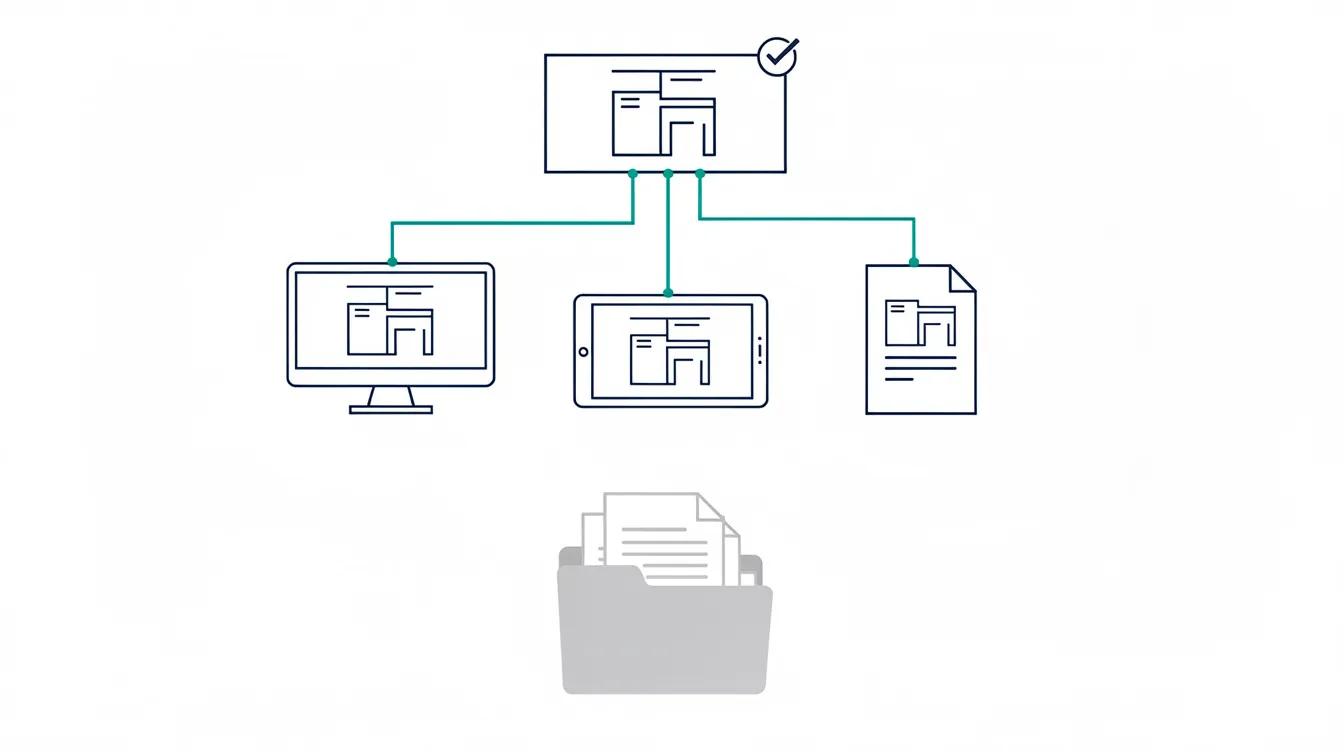
Supersession must reach every current-use channel. Retain earlier revisions under the project's access and retention rules.
Test supersession across every channel
Run the approved supersession test across current-set views, search, direct links, notifications, shared links, downloads, offline devices and controlled prints. For each channel, record the expected result, observed result, owner and corrective action.
Separate platform-controlled access from copies outside the platform. For a direct link to an old revision, record any warning or access restriction. For downloads and prints, verify only the notification, refresh, recall or withdrawal behavior that the product and project process support, especially where integrations with third party business solutions replicate or synchronize drawing files. The contract and project document plan define the acceptance criteria.
How to preserve superseded records without exposing them as current
Retain superseded revisions for the period required by the contract and records policy, while keeping them distinct from the current working set.
Use a superseded status, current-set filters and role-based access. Test direct links, search results, exports and shared views; hiding a record in one screen is not a complete control.
Handle field changes and urgent reissues under the same control model
Urgency does not remove the need to identify the authorized drawing. If the project permits a field instruction, redline or emergency issue, define who can create it, how recipients recognize its permitted use and when it must be incorporated into the controlled drawing record; where email is a source of change, tools like an AODocs Gmail add-on can capture messages and attachments into the controlled environment.
Test the return path as well as the release path. Confirm how annotated field copies, approved changes and rejected proposals are reconciled with the MDR. Record the point at which the temporary instruction ceases to be current and the drawing revision takes its place. The procedure should also state what happens when an urgent change is withdrawn before incorporation.
For each scenario, inspect search, direct links, downloads and current-set exports with a field-role account. A prominent label is useful only if the recipient can see it in the channel actually used for work.
A 10-point drawing revision control audit and audit trails
- Metadata completeness: Are the project-required identifier, revision, status, purpose and issue date present and validated?
- Status enforcement: Who applies the superseded status, and what evidence shows the step completed?
- Approval workflow: Does the approved procedure require retrievable approval evidence before a revision receives its project-defined construction-use status? If the platform enforces the sequence, can the team demonstrate it?
- Distribution records: Can you produce a transmittal log showing who was issued each revision, when and what receipt evidence exists?
- Supersession process: Does the approved procedure remove the prior revision from every defined current-use channel?
- Access controls: Do role-based permissions and views match each participant's authorized document statuses?
- Comparison before issue: Where the project procedure requires visual comparison, is the new revision compared with the previous one during review?
- Printed copy management: Do you maintain a register of controlled hard copies, with a retrieval process for obsolete prints when a new revision is distributed?
- Audit history: Can you retrieve the required version, workflow tracking for approvals and release events, and distribution events for a representative drawing?
- Control review: Is review triggered at defined phase gates, role changes or workflow changes?
Your audit trails should show not just passive saved-change logs but formal state transitions, including who approved the change, when, and under which controlled process.
Where the platform fits
AODocs' drawing-comparison documentation describes comparing two files in the same format family: PDF, TIFF or CAD formats supported by Autodesk Viewer. CAD/PDM and PLM tools may already manage design data and release workflows. Define the wider document-governance requirement before adding a complementary DMS. Any proposed API-based integration needs validation of the records, permissions, revision mapping and error handling.
Advanced Viewer or Autodesk Viewer must be activated. Check applicable browser-extension requirements for the configured environment. CAD comparison requires the Autodesk Viewer integration and its Autodesk Platform Services licensing. Cross-format comparison is unsupported, and PDF comparison is limited to the first page. Use the result as visual review evidence, preserve the separate approval record and test representative files before deployment.
Learn more
Frequently asked questions
What is the difference between a revision and a version in drawing control?
A revision is a project-controlled identifier applied under the document-control procedure, often when content is issued or reissued. A version is a saved state and may include drafts. Approval and permitted use come from the project's status or suitability codes and workflow evidence, not the revision label alone.
Which revision standards apply to engineering drawings?
Use the revision standard and edition named in the contract or owner requirements. ASME Y14.35 addresses identifying and recording revisions to engineering drawings and associated documents. The project must still define its revision codes, approval roles, issue purposes and supersession process. Do not treat one example letter sequence as a universal construction rule.
How should superseded drawings be controlled on site and offline?
Remove the superseded issue from channels designated for current use while preserving authorized historical access. Check search, direct links, downloads, offline devices and controlled prints. Assign notification, refresh and recall responsibilities for copies outside the repository. A platform status change does not prove that every downloaded or printed copy has been withdrawn.
Who should have access to superseded drawing records?
Access should follow the project role model and records policy. Keep superseded records available to authorized users without presenting them as the current working set. Verify that your sign-in and access model supports the required separation between current and superseded records.