
Capture and govern every document, in one platform
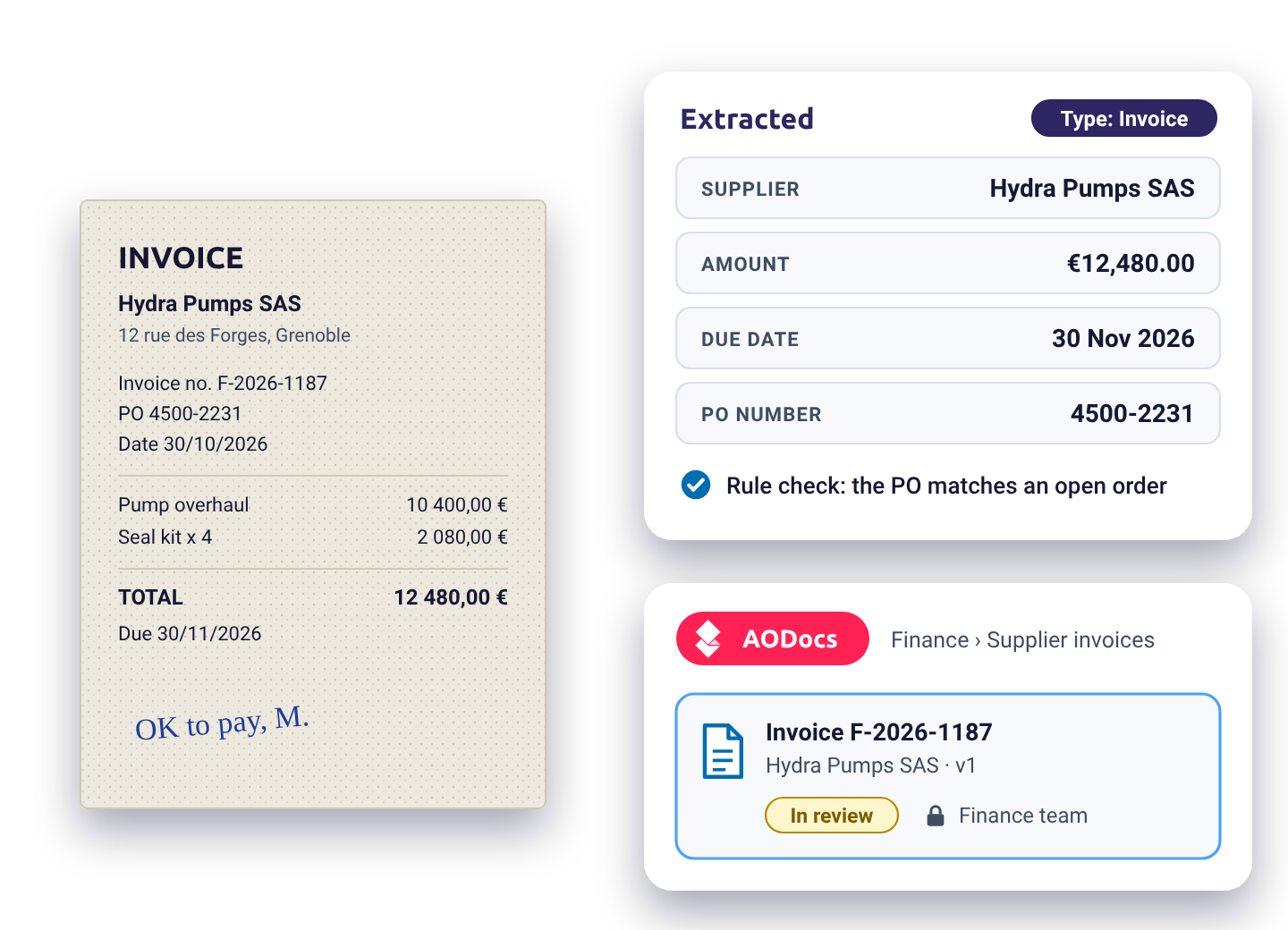
AODocs reads any document, in any language and any format, extracts what matters, checks it against your rules, and files it with its status, version and access rights. No templates to train, no export to another system.
Traditional capture was built for forms that never change
Classic intelligent document processing works well on large volumes of identical forms. Everywhere else, it costs more time than it saves.
Trained one format at a time
Each new layout means templates to build and an OCR model to train. When a supplier changes its invoice, the work starts again.
Values without meaning
It reads characters, not content: a date stays a string, "Net 30" stays two words, and nobody knows which clause matters.
Another system to feed
Extracted data leave for an ERP or a DMS. The document itself stays behind, without status, version or rules.
Generative AI changes what capture can do
Multimodal models read a page the way a person does: layout, handwriting, context. AODocs puts them to work with your rules, and keeps a person in the loop where it matters.
| Criterion | Traditional IDP | AI capture in AODocs |
|---|---|---|
| Flexibility | A template and a trained model per document format, rebuilt when the format changes | Adapts to any document type and layout, with no training per format |
| What is captured | Characters copied from fixed zones, without interpretation | Values understood and normalized, summaries, translations, terms mapped to your vocabulary |
| Getting started | Training sets, zones and templates to configure | An instruction written in plain language, refined on real documents |
| Input quality | Clean, straight, high-resolution scans | Poor scans, rotated or skewed pages, photos, handwriting |
| Languages | One model per language | Every language your LLM reads, with translation on the fly |
| Control | Fixed rules, exceptions handled outside the tool | AI and rules combined; rejected and incomplete extractions are routed for review inside AODocs |
| After extraction | Data exported to another system, the document left behind | The document stays in AODocs, governed: status, version in force, access rights |
| Splitting a batch | Separator sheets, barcodes or a fixed page count; a misplaced page ends up in the wrong document | Reads the pages to find where each document ends, and puts misplaced pages back in order |
Flexibility
Traditional IDP
A template and a trained model per document format, rebuilt when the format changes
AI capture in AODocs
Adapts to any document type and layout, with no training per format
What is captured
Traditional IDP
Characters copied from fixed zones, without interpretation
AI capture in AODocs
Values understood and normalized, summaries, translations, terms mapped to your vocabulary
Getting started
Traditional IDP
Training sets, zones and templates to configure
AI capture in AODocs
An instruction written in plain language, refined on real documents
Input quality
Traditional IDP
Clean, straight, high-resolution scans
AI capture in AODocs
Poor scans, rotated or skewed pages, photos, handwriting
Languages
Traditional IDP
One model per language
AI capture in AODocs
Every language your LLM reads, with translation on the fly
Control
Traditional IDP
Fixed rules, exceptions handled outside the tool
AI capture in AODocs
AI and rules combined; rejected and incomplete extractions are routed for review inside AODocs
After extraction
Traditional IDP
Data exported to another system, the document left behind
AI capture in AODocs
The document stays in AODocs, governed: status, version in force, access rights
Splitting a batch
Traditional IDP
Separator sheets, barcodes or a fixed page count; a misplaced page ends up in the wrong document
AI capture in AODocs
Reads the pages to find where each document ends, and puts misplaced pages back in order
Capture and governance, in the same place
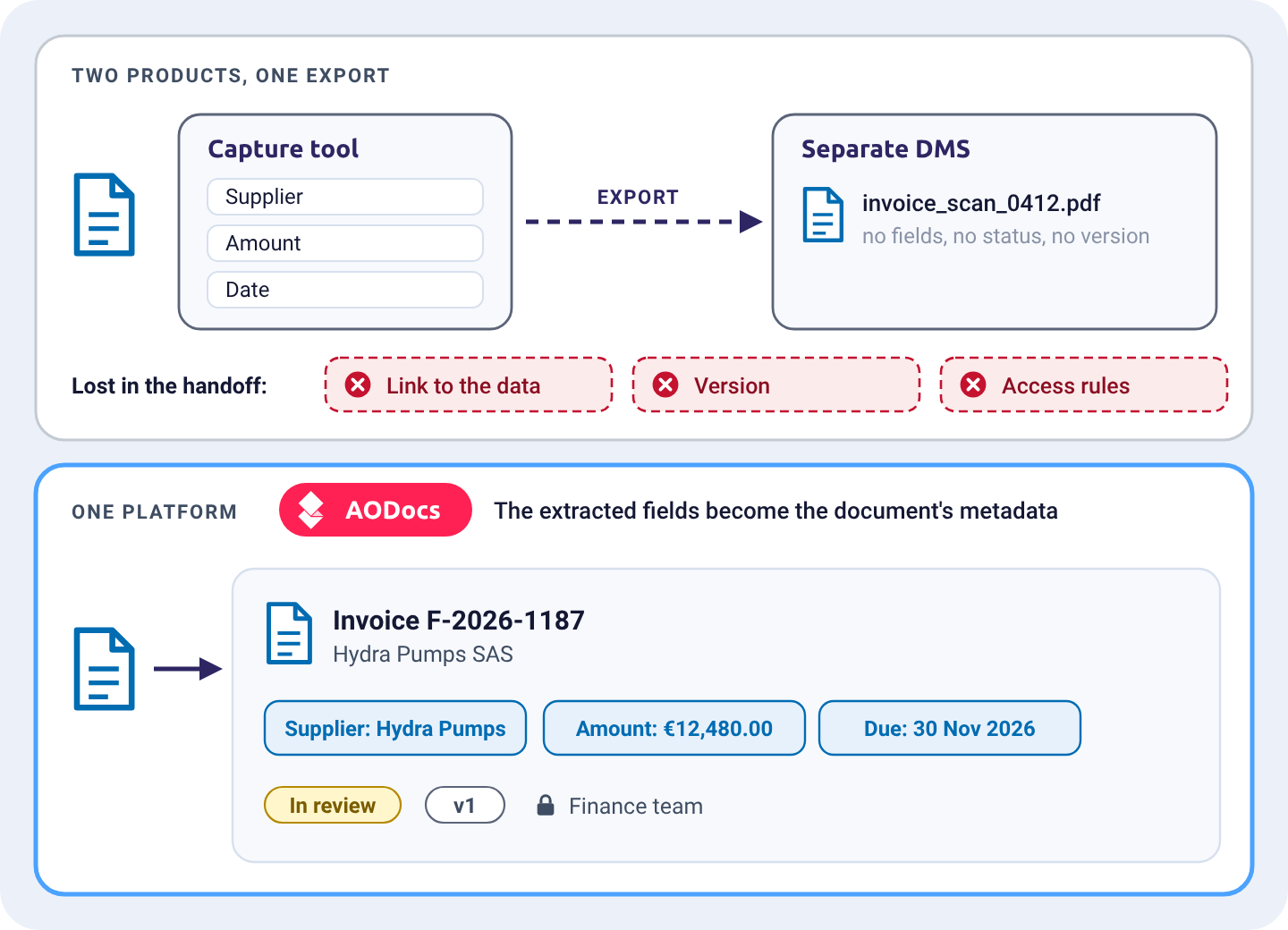
In most companies, capture and document management are two products joined by an export. Every handoff loses something: the link to the original, the version, the access rules. AODocs does both. The data it extracts become the document's metadata, so the document is classified, checked, approved and found with them.
One source
The extracted values and the document never drift apart
One set of rules
Workflows, retention and permissions apply from the moment of capture
One answer later
The same metadata power search and AI answers, from the version in force
Split and reorder
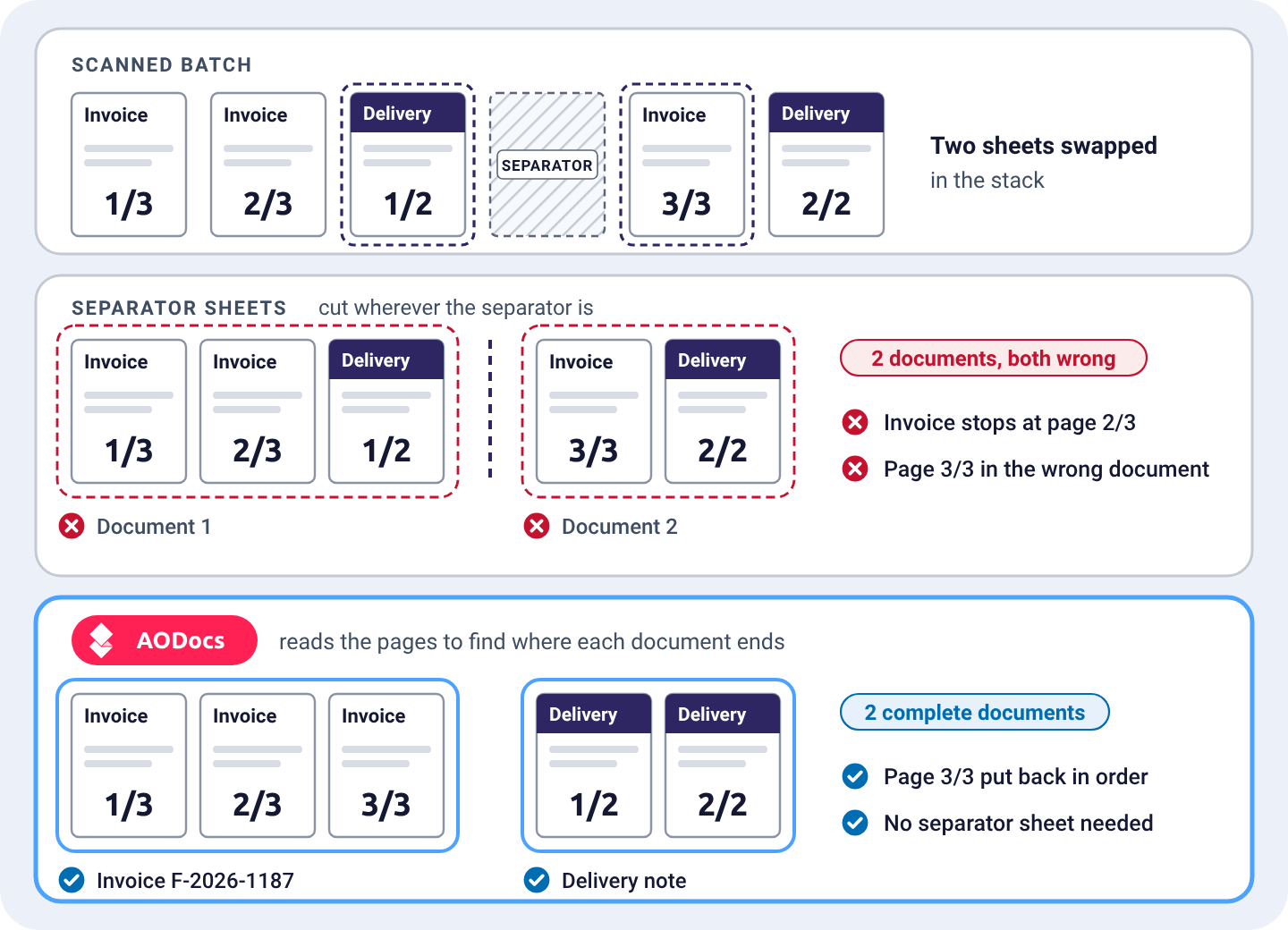
A scanned batch rarely holds one clean document. AODocs reads the pages to find where each document ends, without separator sheets, barcodes or fixed page counts. When a page is out of place, it notices: the last page of an invoice, scanned after the delivery note, goes back where it belongs.
Classify and describe
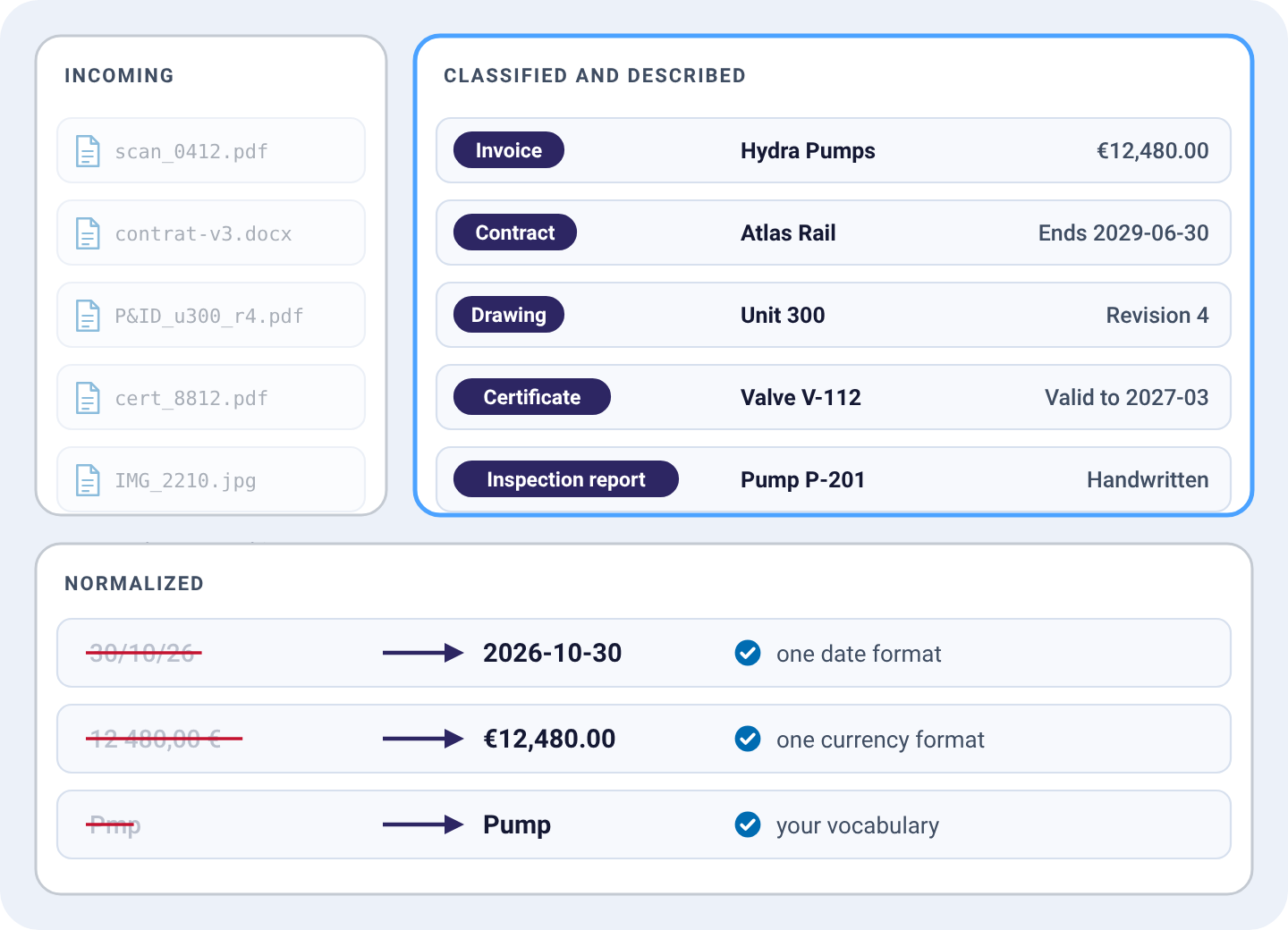
Every incoming document gets its type and its key fields, by AI and by rules, without a template per format.
Classification
Invoice, contract, drawing, certificate, report, sorted on arrival
Metadata extraction
Supplier, amounts, dates, equipment, parties, references
Normalization
Dates, currencies and units in one format; terms mapped to your vocabulary
Check against your rules
AODocs checks what a document says, and whether a set of documents is complete.
Document checks
A signature present, a date in range, a mandatory clause included
File checks
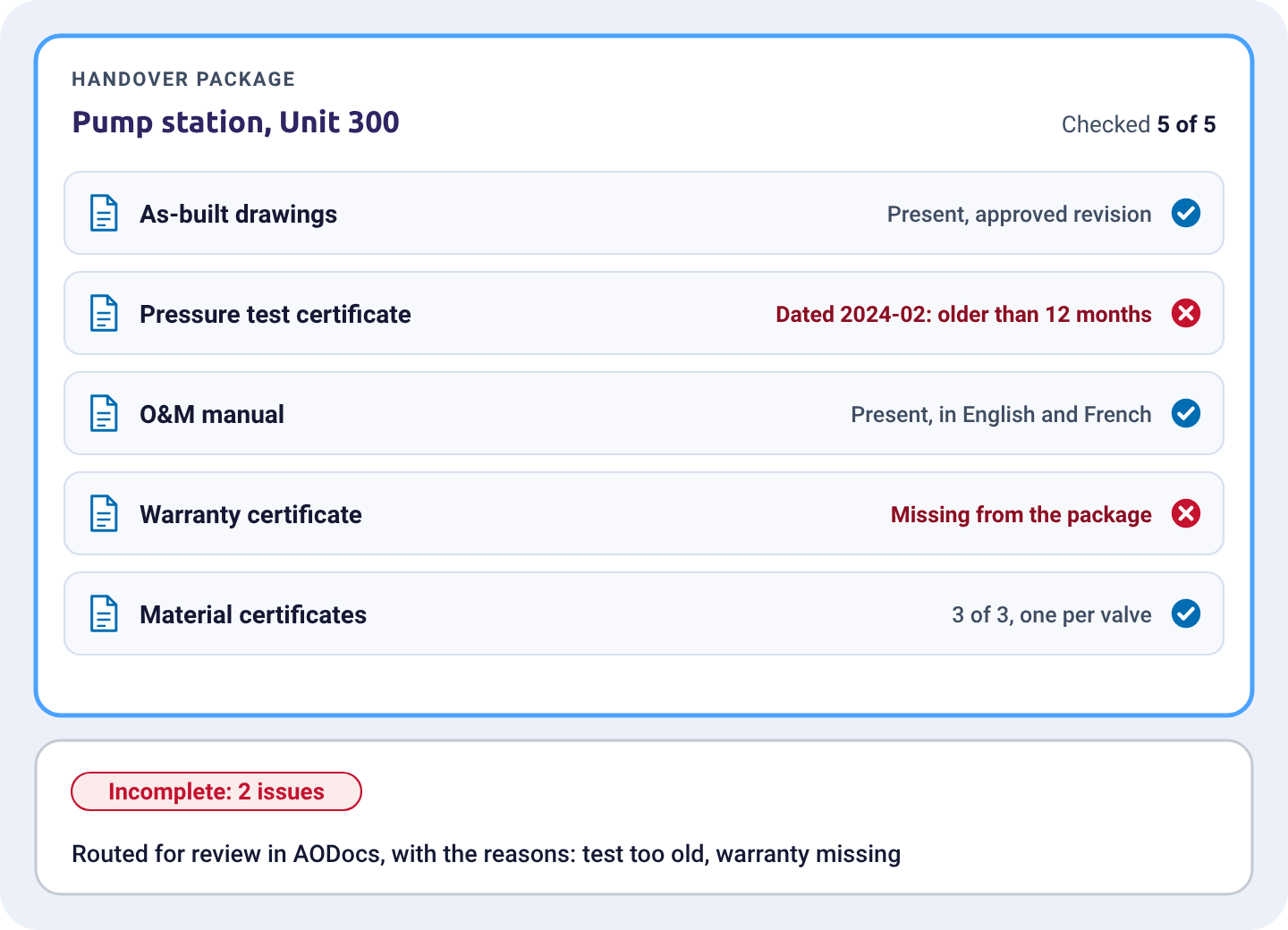
Every certificate in a handover package, every piece of a KYC file, before it moves on
Exceptions
Rejected or incomplete extractions go to review inside AODocs, with the reason
Summarize and translate
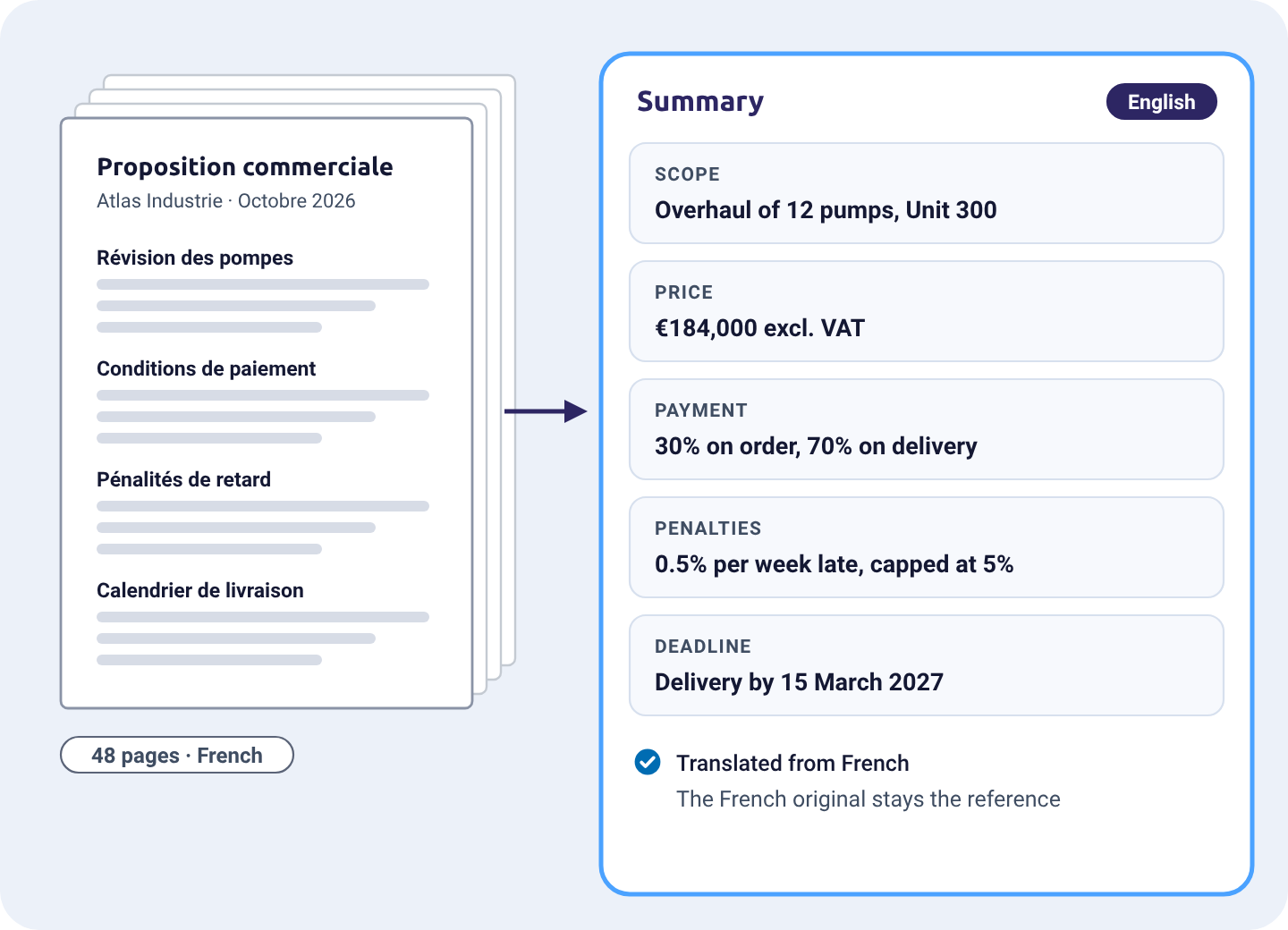
The long document becomes the short answer a team needs.
Commercial proposals
Scope, price, terms on one screen
Financial and legal summaries
Amounts, penalties, liabilities, deadlines
Translation
On the fly, in any language your LLM reads, the original kept as the reference
Built for the documents you actually receive
Any language
Every language your LLM reads, with translation on the fly. Bring your own model, cloud or private.
Any format
PDF, scans, photos, office files, emails. No template to build when a layout changes.
Handwriting
Handwritten notes, annotations and forms are read with the rest of the page.
Poor scans
Low resolution, upside down, skewed or photographed at an angle: multimodal models read them anyway.
Frequently asked questions
Can AODocs read handwriting and poor scans?
Yes. Multimodal models read handwriting, low-resolution scans, and pages that are rotated, skewed or photographed at an angle.
Do I need to train a model for each document type?
No. You describe what to extract in plain language and refine it on real documents. A new layout or a new supplier needs no new template.
Is AODocs an IDP or a DMS?
Both. AODocs captures documents with generative AI and rules, then governs them in the same platform: the extracted data become the document's metadata, with its status, version and access rights.
What happens when an extraction fails or is incomplete?
AODocs flags rejected and incomplete extractions and routes them for review inside the platform, so nobody works from a half-captured document.
See AODocs read your own documents
Bring a few of your hardest documents: we'll show you what AODocs captures, and where it files them.