
Start with SharePoint. Know when you need more.
When a team needs a document process, it reaches for SharePoint, and rightly so: it is already part of Microsoft 365, and Copilot works on top of it. Often, that is enough. Not always. Here is where the line is, and what AODocs adds inside your own tenant.

This is probably your starting point
Most organisations already run a document management system of sorts: the one Microsoft 365 gives them. Start there.
Your documents in a Microsoft 365 world
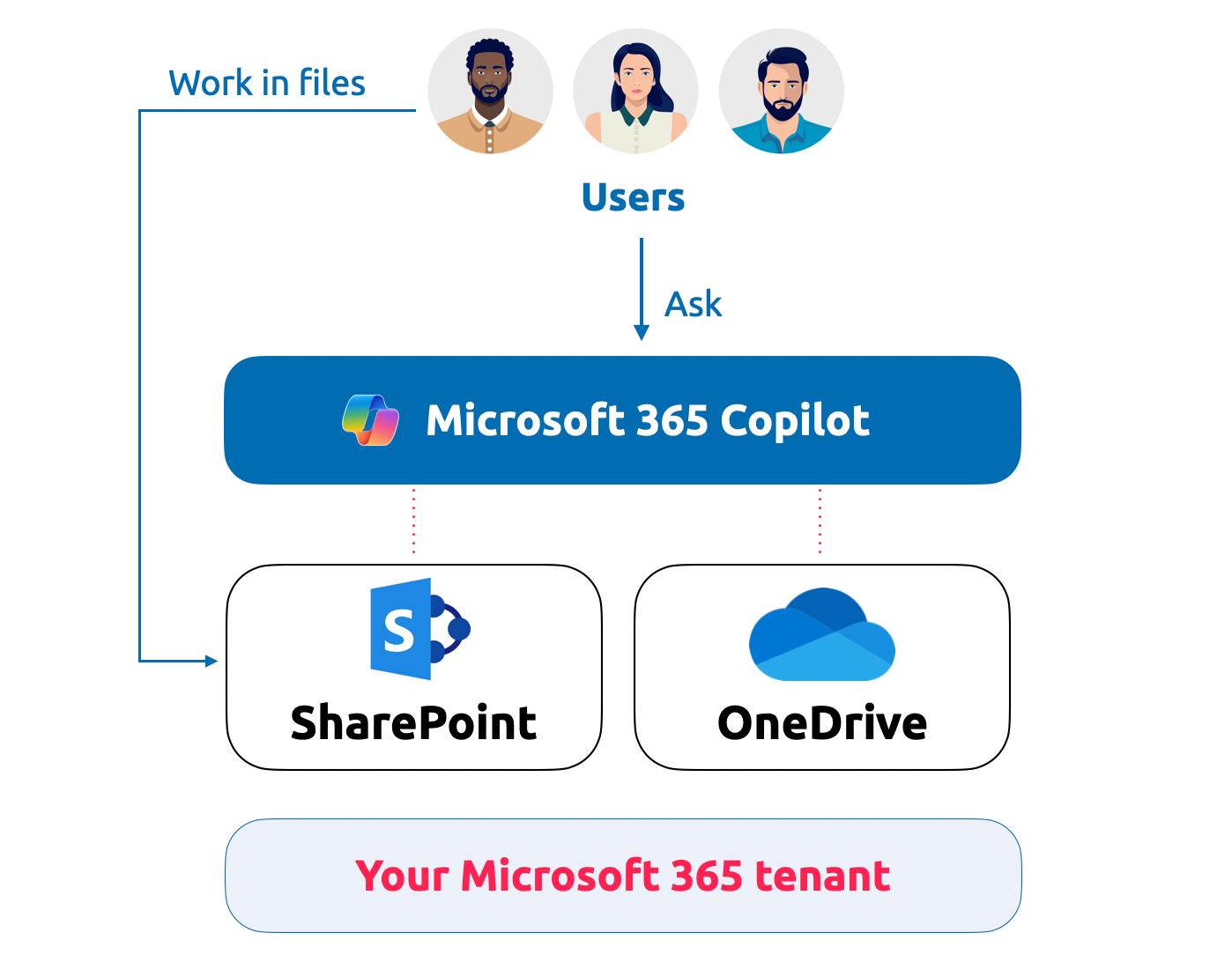
Your teams create and share files in SharePoint and OneDrive, and ask Microsoft 365 Copilot, which draws on the same content. It all sits in your tenant, under your Microsoft security policies. For most collaborative work, this is the right place to start.
Where the line is
There is no universal threshold. These are the signals we see in practice.
| Criterion | SharePoint alone is enough | Add AODocs when |
|---|---|---|
| What documents do | They support collaboration: working drafts, team notes, project files nobody will audit | They carry proof: an auditor, a regulator or a court may ask who approved which version, and when |
| Document types | A few, with simple approval or none | Several, each with its own lifecycle and review cycle |
| Who takes part | One team owns the content and its rules | Suppliers, contractors or partners contribute or consume controlled documents |
| Role of AI | Convenience: summaries, search | Answers people act on, where a wrong answer has a cost |
| Integrations | Metadata stays simple and is filled in by hand | Documents must exchange data with your CRM, ERP and other business applications |
| Scale | Few sites, stable teams: conventions hold | Volumes grow across sites, teams and years, beyond what conventions can hold |
What documents do
SharePoint alone is enough
They support collaboration: working drafts, team notes, project files nobody will audit
Add AODocs when
They carry proof: an auditor, a regulator or a court may ask who approved which version, and when
Document types
SharePoint alone is enough
A few, with simple approval or none
Add AODocs when
Several, each with its own lifecycle and review cycle
Who takes part
SharePoint alone is enough
One team owns the content and its rules
Add AODocs when
Suppliers, contractors or partners contribute or consume controlled documents
Role of AI
SharePoint alone is enough
Convenience: summaries, search
Add AODocs when
Answers people act on, where a wrong answer has a cost
Integrations
SharePoint alone is enough
Metadata stays simple and is filled in by hand
Add AODocs when
Documents must exchange data with your CRM, ERP and other business applications
Scale
SharePoint alone is enough
Few sites, stable teams: conventions hold
Add AODocs when
Volumes grow across sites, teams and years, beyond what conventions can hold
When documents need more, extend your tenant
When documents need more, extend your tenant
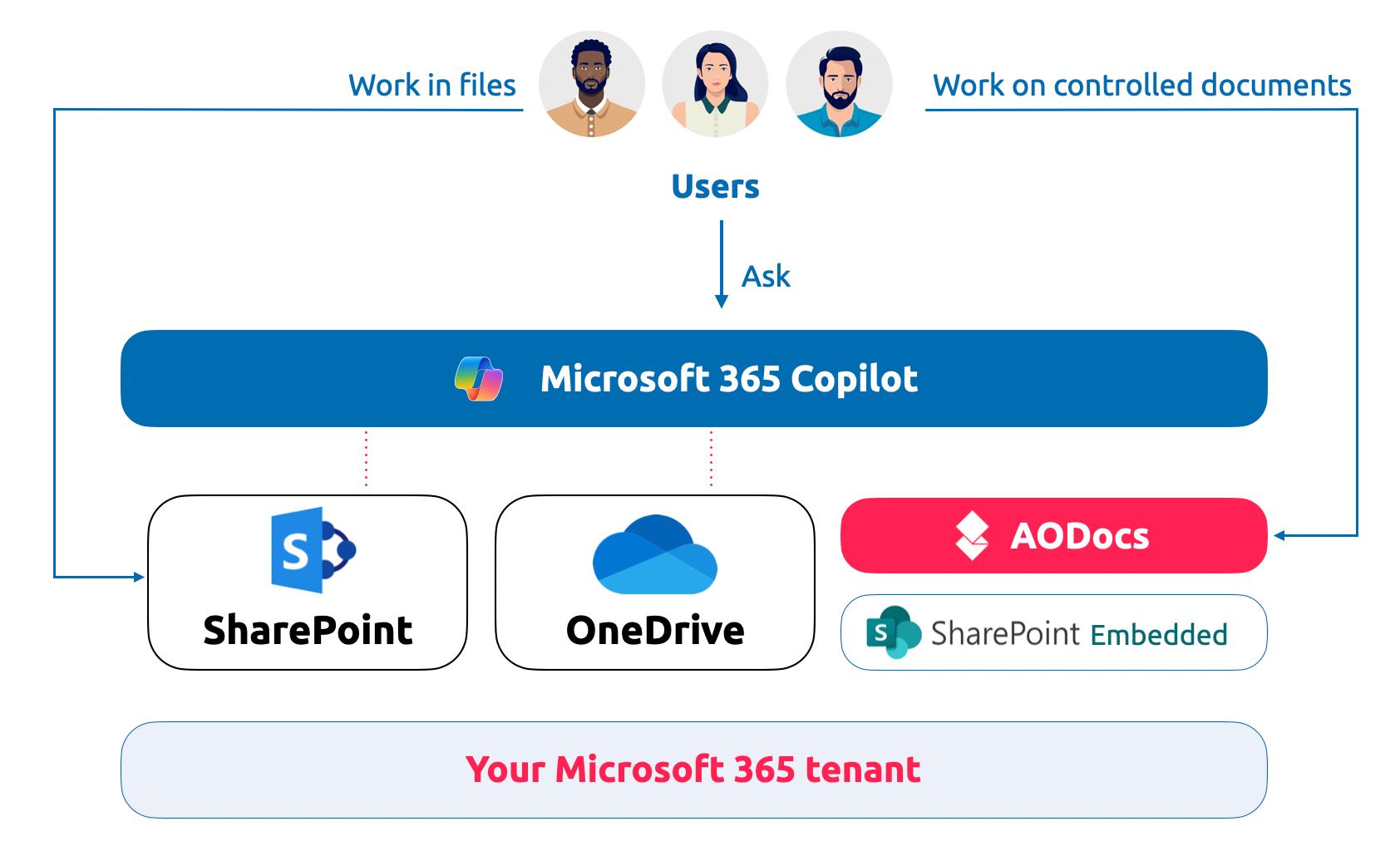
Some documents need a controlled lifecycle, a version in force and secure collaboration across teams. AODocs adds that layer inside the same tenant, running on SharePoint Embedded, next to SharePoint and OneDrive. Your teams keep working in files and asking Copilot, and Copilot draws on the governed documents too.
What AODocs adds, inside your tenant
AODocs runs the document layer on SharePoint Embedded. Your files stay in your tenant, under your Purview policies, and Microsoft 365 keeps doing what it does best.
At least four components, one team to keep them running
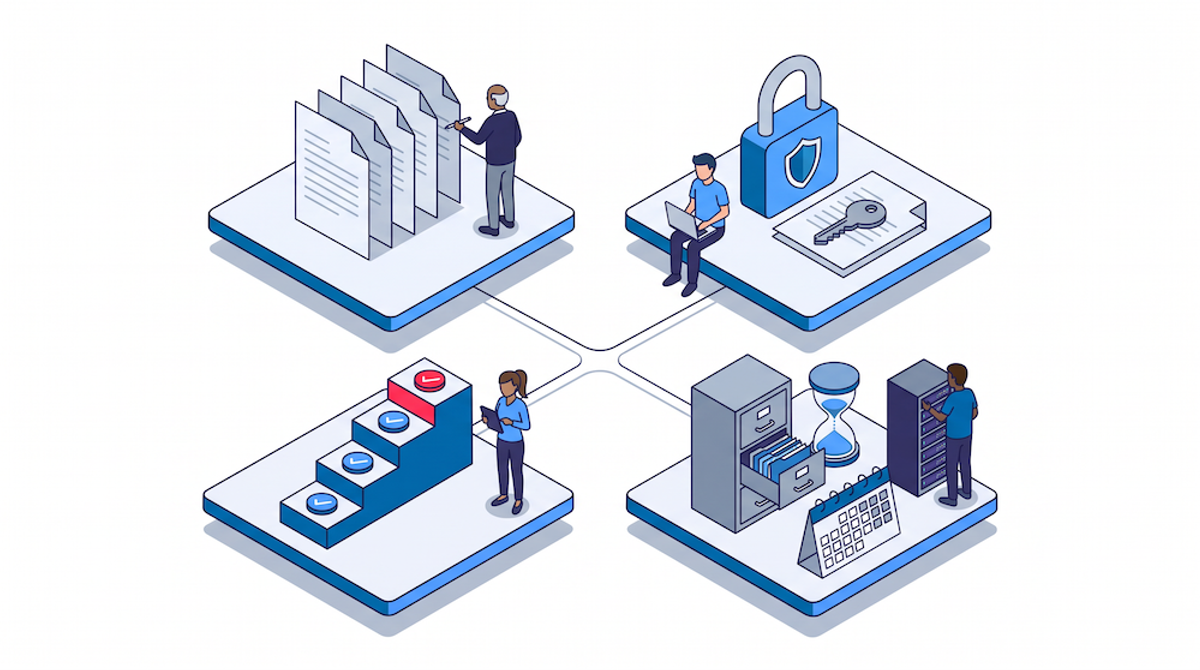
Versions, access, approvals, retention… Each one can be built on SharePoint with the tools your team already knows. Each one also needs an owner, a test plan and an update path, for as long as the documents live.
Document control
One designated version in force for each document; superseded revisions leave circulation.
When it matters: several teams must work from the same authoritative version.
Review and approval workflows
Review, approval, periodic re-review and acknowledgement, configured rather than coded.
When it matters: procedures must be reviewed on schedule and acknowledged by the people who apply them.
Document types and required metadata
Each document type carries its own required fields, rules and lifecycle, enforced at creation.
When it matters: retention, access or approval depend on what a document is.
Evidence on demand
One traceable record per document: who reviewed and approved which revision, under which procedure, and when.
When it matters: an auditor, a regulator or a client asks for proof.
Controlled external sharing
Suppliers, contractors and partners contribute through controlled access, without copies escaping your control.
When it matters: documents cross company boundaries.

Trusted AI
AIDA answers only from controlled, validated content, and Microsoft 365 Copilot draws on the same governed documents.
When it matters: people act on what AI tells them.
SharePoint alone, or SharePoint with AODocs
Same tenant, same Microsoft security. The difference is who designs, enforces and maintains the document layer.
| Criterion | SharePoint alone, configured in-house | AODocs with SharePoint Embedded |
|---|---|---|
| Where files live | Your Microsoft 365 tenant | Your Microsoft 365 tenant, in dedicated SharePoint Embedded containers |
| Retention and data loss prevention | Microsoft Purview | Microsoft Purview: the same policies apply |
| Document lifecycle | Custom columns and flows, configured library by library | Statuses from draft to obsolete, applied the same way in every library |
| The version in force | A convention people are asked to follow | One designated current revision; superseded ones leave circulation |
| Required metadata | Optional unless each library is set up to enforce it | Required by document type, at creation |
| Review and periodic re-review | Power Automate flows to build and maintain | Configurable workflows, with scheduled reviews |
| Audit trail | Assembled from several logs | One traceable record per document: who did what, when, under which procedure |
| AI answers | Agents read whatever the library holds | AIDA and Copilot read controlled, validated content |
| Who keeps it running | Your team, through every reorganisation and platform update | AODocs, as a product |
| Business applications | Custom connectors to build and maintain for each application | Ready-made integrations with SAP, Salesforce and other business applications |
Where files live
SharePoint alone, configured in-house
Your Microsoft 365 tenant
AODocs with SharePoint Embedded
Your Microsoft 365 tenant, in dedicated SharePoint Embedded containers
Retention and data loss prevention
SharePoint alone, configured in-house
Microsoft Purview
AODocs with SharePoint Embedded
Microsoft Purview: the same policies apply
Document lifecycle
SharePoint alone, configured in-house
Custom columns and flows, configured library by library
AODocs with SharePoint Embedded
Statuses from draft to obsolete, applied the same way in every library
The version in force
SharePoint alone, configured in-house
A convention people are asked to follow
AODocs with SharePoint Embedded
One designated current revision; superseded ones leave circulation
Required metadata
SharePoint alone, configured in-house
Optional unless each library is set up to enforce it
AODocs with SharePoint Embedded
Required by document type, at creation
Review and periodic re-review
SharePoint alone, configured in-house
Power Automate flows to build and maintain
AODocs with SharePoint Embedded
Configurable workflows, with scheduled reviews
Audit trail
SharePoint alone, configured in-house
Assembled from several logs
AODocs with SharePoint Embedded
One traceable record per document: who did what, when, under which procedure
AI answers
SharePoint alone, configured in-house
Agents read whatever the library holds
AODocs with SharePoint Embedded
AIDA and Copilot read controlled, validated content
Who keeps it running
SharePoint alone, configured in-house
Your team, through every reorganisation and platform update
AODocs with SharePoint Embedded
AODocs, as a product
Business applications
SharePoint alone, configured in-house
Custom connectors to build and maintain for each application
AODocs with SharePoint Embedded
Ready-made integrations with SAP, Salesforce and other business applications
Questions IT leaders ask us
Can SharePoint be used as a document management system?
Yes, for collaborative content: versioning, permissions, metadata and Purview retention cover many needs. SharePoint becomes harder to run as a DMS when documents carry proof. Controlled lifecycles, a designated version in force, required metadata, periodic reviews and audit-ready evidence must then be built and maintained with Power Automate and custom configuration. AODocs adds that layer inside your Microsoft 365 tenant, on SharePoint Embedded.
Can't our IT team build document control on SharePoint with Power Automate and Purview?
Yes, a skilled team can. Content types, Power Automate approvals and Purview retention cover the building blocks. The cost lies in running the result: keeping lifecycle rules consistent across libraries, maintaining flows when their owners move on, and producing audit evidence from several logs. AODocs delivers that layer as a product inside your Microsoft 365 tenant, so your team spends its time on business needs rather than maintenance.
Does AODocs replace SharePoint?
No. With the SharePoint Embedded integration, files managed by AODocs are stored in dedicated containers inside your own Microsoft 365 tenant. Purview and DLP policies apply, people keep co-authoring in Word, Excel and PowerPoint, and Microsoft 365 Copilot can work on the content. AODocs adds the document management layer: lifecycle, workflows, required metadata and audit trail. SharePoint remains your system of work; AODocs adds the system of record.
What does AODocs add that SharePoint does not provide out of the box?
A consistent lifecycle across libraries, from draft to obsolete; one designated version in force per document; metadata required by document type; configurable review, approval and periodic re-review workflows; a single traceable record per document for audits; and an AI agent, AIDA, that answers only from validated content. SharePoint provides building blocks for some of these. AODocs delivers them configured, enforced and maintained.
See where your SharePoint stands
We will map what SharePoint covers, what a DMS layer adds, and what each option costs to run.